You have open positions in ProfitTrailer. Real money, mid-DCA, three or four legs deep on a coin that has not recovered yet, and the average price is the only thing standing between you and a realized loss. Every guide you find on how to migrate from ProfitTrailer quietly assumes you are fine abandoning those positions and starting clean. You are not. You have money sitting in open PT positions and nowhere obvious to move them, and PT's EQPRICE logic is the one piece of the setup you actually trust. Losing that is not a migration. It is a write-off with extra steps.
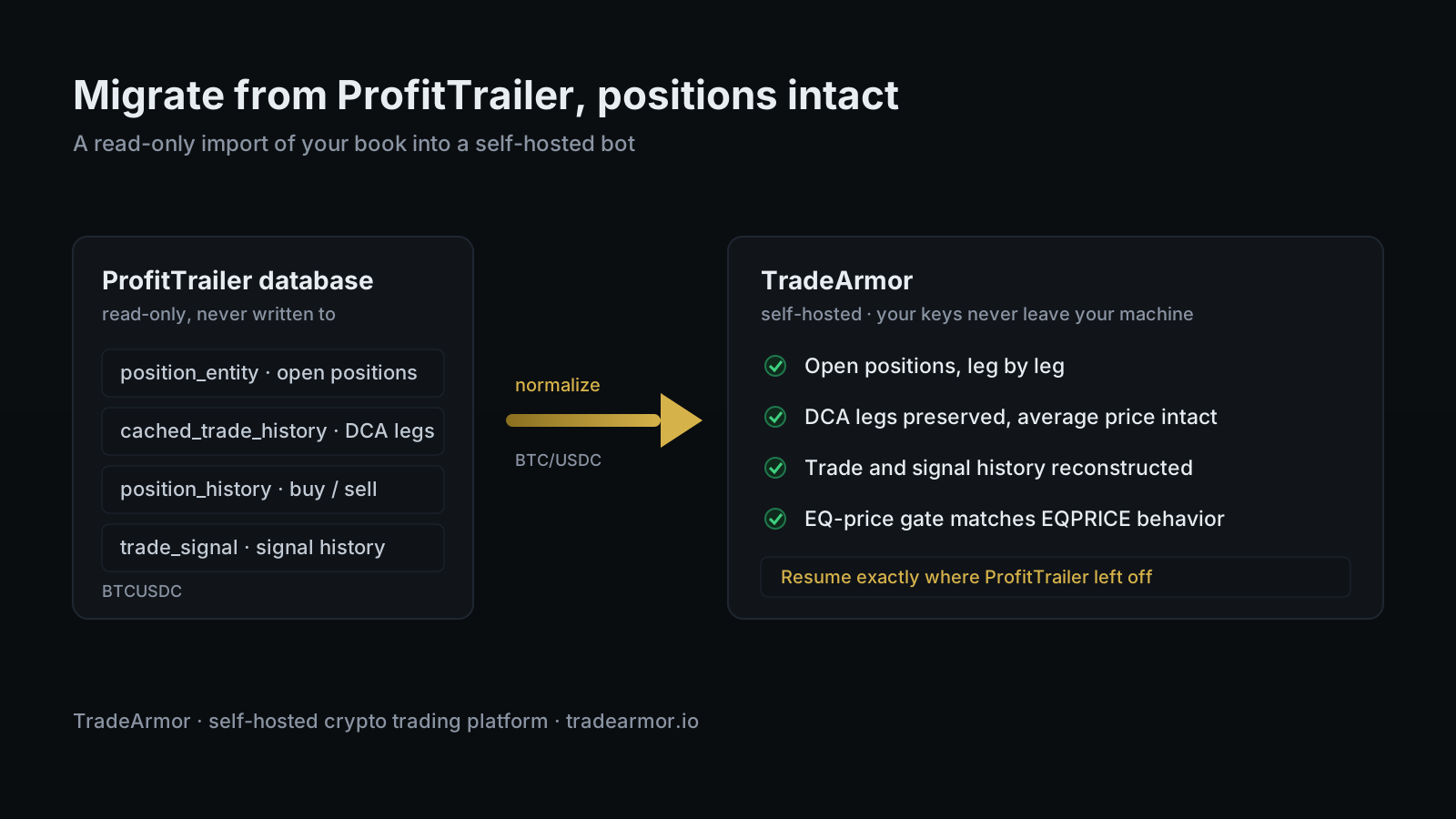
This guide is the other path: moving your book intact. TradeArmor is a self-hosted crypto trading platform, the kind that runs on your own machine where your API keys never leave your hardware, and it covers the full job rather than one slice of it. Built-in BTC/USDC signals with a multi-year track record, 15 technical indicators, a plain-English strategy builder, DCA, grid, futures, copy trading, backtesting, paper trading, and tax exports all live on the same engine. The reason it matters here is narrower than all of that. TradeArmor ships a migration tool that reads your ProfitTrailer database and rebuilds your positions, your DCA legs, your trade history, and your signal history on the other side, with the EQ-price buy gate set to behave the way PT's did.
First, the respectful part, because it is true. ProfitTrailer taught a generation of traders how to run a DCA bot. The leg tracking, the patience, the EQPRICE math that keeps a bot from panic-buying a falling knife: that was the curriculum, and a lot of us learned it there. The community is smaller than it was at its peak, and people leave for their own reasons. If you have decided to move, the question is not whether ProfitTrailer was good. It was. The question is whether you can take your positions with you. You can.
What migrating from ProfitTrailer actually moves
A migration that deserves the name moves the things you cannot recreate by hand. Here is what transfers.
Open positions, leg by leg. Every position ProfitTrailer currently holds comes across with its individual DCA legs intact, not collapsed into a single averaged row. That distinction is the whole game. The average price is an output of the legs, so if a tool imports one blended entry instead of the real legs, your buy-gate logic loses the anchor it needs and the bot starts making decisions on bad data.
Trade history. Your full buy and sell history reconstructs on the TradeArmor side, so your records and your P&L history do not start from zero on day one.
Signal history and account snapshots. Past signal activity and account balance snapshots carry over, which keeps your analytics honest instead of pretending your trading began the moment you switched.
Pair formatting, normalized for you. ProfitTrailer stores a pair as BTCUSDC. TradeArmor and the exchanges it talks to expect BTC/USDC. The migration handles that conversion automatically across common quote currencies, so you are not hand-editing symbols.
One thing worth saying plainly: the migration reads your ProfitTrailer database read-only. It opens the file, pulls what it needs, and never writes a single byte back. A read-only import is the rarest kind of software promise, which is the boring kind that turns out to be true.
What gets translated, and what you reset
Two engines that were not built by the same team do not share a config file, and pretending otherwise would be how migrations quietly corrupt your settings. So TradeArmor draws a clean line.
Your historical data, the positions and legs and trades, imports faithfully because it is a record of what happened. Your strategy configuration gets translated into TradeArmor's own settings rather than copied character for character. The most important piece of that translation is the buy gate. ProfitTrailer's EQPRICE behavior, where additional DCA buys are gated against the lowest unsold leg rather than the simple average, maps onto TradeArmor's EQ-price gate: past a DCA level you choose, the next buy only fires when price sits below the lowest unsold leg times 0.999. Same idea, same protection against stacking into a crash too fast. If EQPRICE was the only logic you trusted in ProfitTrailer, this is the line in the post to reread.
You confirm the translated settings before live trading turns on. That review step is not a formality. It is where you make sure the bot will act the way you expect before it touches a live order.
Before you start: the prerequisites
Three things in place and the migration takes a few minutes.
- A running TradeArmor instance. Download,
pip install -r requirements.txt,python main.py, and open the setup wizard atlocalhost:8080/setup. The bot runs on your hardware, so this is a local install, not an account on someone else's server. - A current copy of your ProfitTrailer database. Work from a fresh copy so the import sees your latest legs and trades rather than a stale snapshot. The migration never writes to this file, but working from a copy is good hygiene.
- An exchange API key scoped to read and trade only. Not withdrawal. A trading bot never needs permission to move funds off the exchange, and creating the key without withdrawal access means it is structurally incapable of it. If you want the full reasoning, we wrote a whole piece on whether a trading bot can withdraw your funds and a deeper one on running a crypto trading bot without API key risk. The short version: read plus trade, nothing more.
The contrast with the usual switching advice is hard to miss. The SaaS answer to changing bots is to hand a second company your keys and hope the second database holds up better than the first one did. Self-hosting both sides means the only machine your keys touch is yours.
How to migrate from ProfitTrailer, step by step
The migration runs from the TradeArmor dashboard. No command line gymnastics, no manual SQL.
- Open the migration tool. In the dashboard, go to the migration screen. This is where you hand TradeArmor your ProfitTrailer database.
- Upload your ProfitTrailer database. Point it at the copy you made. The tool ingests the file locally on your own machine. Nothing uploads to a remote server.
- Run the analysis. TradeArmor scans the database read-only and shows you a preview before anything is imported: how many open positions it found, how many DCA legs per position, how many EQ sells, your buy and sell history counts, and total signals. It also cross-checks against your live exchange balances so the numbers line up.
- Read the warnings. The preview flags edge cases instead of silently swallowing them. RESERVED positions are skipped. Dust positions, the ones with no real cost basis left, are imported as closed so they do not clutter your active book. You see all of this before you commit.
- Execute the import. Confirm, and TradeArmor writes the positions, legs, history, and signals into its own database. During the import it holds the DCA and EQ engines quiet so a half-imported position cannot trigger a spurious buy mid-process.
- Verify your positions. Open the Positions page. Every imported position should show its correct leg count and average price. Expand a position to see the rule inspector, which lays out the Next DCA Buy, EQ Sell, and Full Sell conditions with a live red or green dot on each.
- Turn trading on. Once the positions and rules check out, enable live trading. The bot picks up exactly where ProfitTrailer left off, managing the same positions against the same kind of buy gate.
Verifying the migration worked
Do not skip this. A migration you did not verify is a hope, not a result.
Start on the Positions page and confirm the leg counts match what ProfitTrailer showed. The average price is the tell: if a position imported with the right legs, its average will match. Expand a few positions and read the rule inspector. The EQ Sell and Next DCA Buy rows show you the exact conditions the bot is now watching, with the current value next to each, so you can confirm the buy gate is set where you want it.
Then check the Trades page for your imported history and the Signals page for past signal activity. If those populated, the record came across cleanly. The whole point of verifying before you go live is that the only safe time to catch a translation you disagree with is while the bot is still idle.
Why self-hosting changes the migration math
Here is the part the SaaS world cannot offer you, because of how it is built.
When you migrate from ProfitTrailer into a self-hosted bot, your data moves from one database you control to another database you control. Your ProfitTrailer file stays on your disk, untouched. Your new TradeArmor database lives on the same machine. Your positions sit on the exchange under keys that never left your hardware. At no point does a third party hold your funds, your history, or your ability to walk it all back. Your positions are not a loyalty program. You are supposed to be able to take them with you, and on a self-hosted stack you actually can.
That is the same reason the migration can be read-only and honest in the first place. There is no incentive to lock you in, because there is no custodial relationship to protect. TradeArmor is one entry in a field of options, and if you want to see the full landscape first, our guide to the best ProfitTrailer alternative lays out what to look for, and the broader case for a self-hosted crypto trading bot covers why the keys-stay-home model is the one worth migrating toward.
You ran ProfitTrailer because you wanted a bot that respected the mechanics. Migrate into a platform that respects them too, and respects your right to keep what you built. That is the move: same discipline, more features, your keys, your machine.
Frequently asked questions
Does migrating from ProfitTrailer keep my open positions? Yes. The migration reads your ProfitTrailer database and imports every open position with its full set of DCA legs, so the bot resumes managing each position at the exact average price and leg count it had before. Nothing is flattened and no position is closed during the import.
Will my DCA buy behavior change after I migrate from ProfitTrailer? It should not. TradeArmor's EQ-price buy gate matches ProfitTrailer's EQPRICE formula: past a configurable DCA level, the next buy only fires when price is below the lowest unsold leg times 0.999. The import preserves the leg history that gate depends on.
Do I have to stop ProfitTrailer before I migrate? Work from a current copy of the database so the import sees your latest data. The migration reads that file read-only and never writes back, so your ProfitTrailer install is untouched. Many people run a copy through, verify, then switch trading over.
What does the migration not bring across? Position and DCA data, trade history, and signal history transfer. Your strategy configuration is translated into TradeArmor's settings rather than copied verbatim, since the two engines do not share a config format. You review the translated settings before turning live trading on.
Is migrating reversible? Your ProfitTrailer install still exists with its own database intact, because the migration never modified it, and your positions still sit on the exchange under your own keys. Self-hosting both bots means nobody holds your funds or your history during the switch.
Ed Cava builds TradeArmor and trades with it. He ran ProfitTrailer for years before building the successor he wished he had.