Your exchange is fine with you trading. Your network path to it is the problem, and that is the real reason to run a crypto trading bot behind a VPN. Maybe your home IP keeps getting flagged and rate limited, maybe you want the bot's traffic locked to one address you can whitelist, or maybe you just refuse to let an automated process talk to an exchange over a connection that can silently fall back to your bare ISP route. "Docker plus VPN is a pain, does anyone do this out of the box?" is a real question people ask, and the usual answer is a weekend of fighting container networking. It does not have to be.
This is the setup, shipped, not a tutorial you have to reverse engineer. You want something that just runs, and that means the network underneath it has to be boring. Running a crypto trading bot behind a VPN comes down to two things: getting the container's traffic into the tunnel without leaks, and letting the bot still talk to the host and the outside world it actually needs. Get those right and the bot runs 24/7 with a clean, isolated, predictable network identity. Get them wrong and you spend Saturday reading Docker forum threads about why nothing connects.
TradeArmor is built for people who want to own this layer instead of renting it. It is a self-hosted crypto trading platform: built-in BTC/USDC signals with a multi-year live track record, 15 real-time technical indicators, a plain-English AI strategy builder, plus DCA, grid, futures, copy trading, backtesting, paper trading, and tax reporting, all running on your own hardware where your API keys never leave your machine. Self-hosted is the whole point here. The bot runs in a container you control, on a network you control, and TradeArmor ships a docker-compose.vpn.yml so the VPN part is a config you fill in, not an architecture you invent.
When running a crypto trading bot behind a VPN makes sense
Let me be straight about this before you route a single packet, because the internet is full of advice that will get your exchange account frozen.
A VPN does not get you around KYC. If you verified your identity and your region with an exchange, the exchange knows who and where you are no matter what IP you log in from. Using a VPN to reach a market you are barred from usually violates the exchange's terms of service, and exchanges detect it through timing inconsistencies and proxy fingerprinting. The worst case is a permanent ban and frozen funds. That is a far worse outcome than having no automation at all.
So the legitimate reasons to run a crypto trading bot behind a VPN are narrower and more boring than the forums suggest:
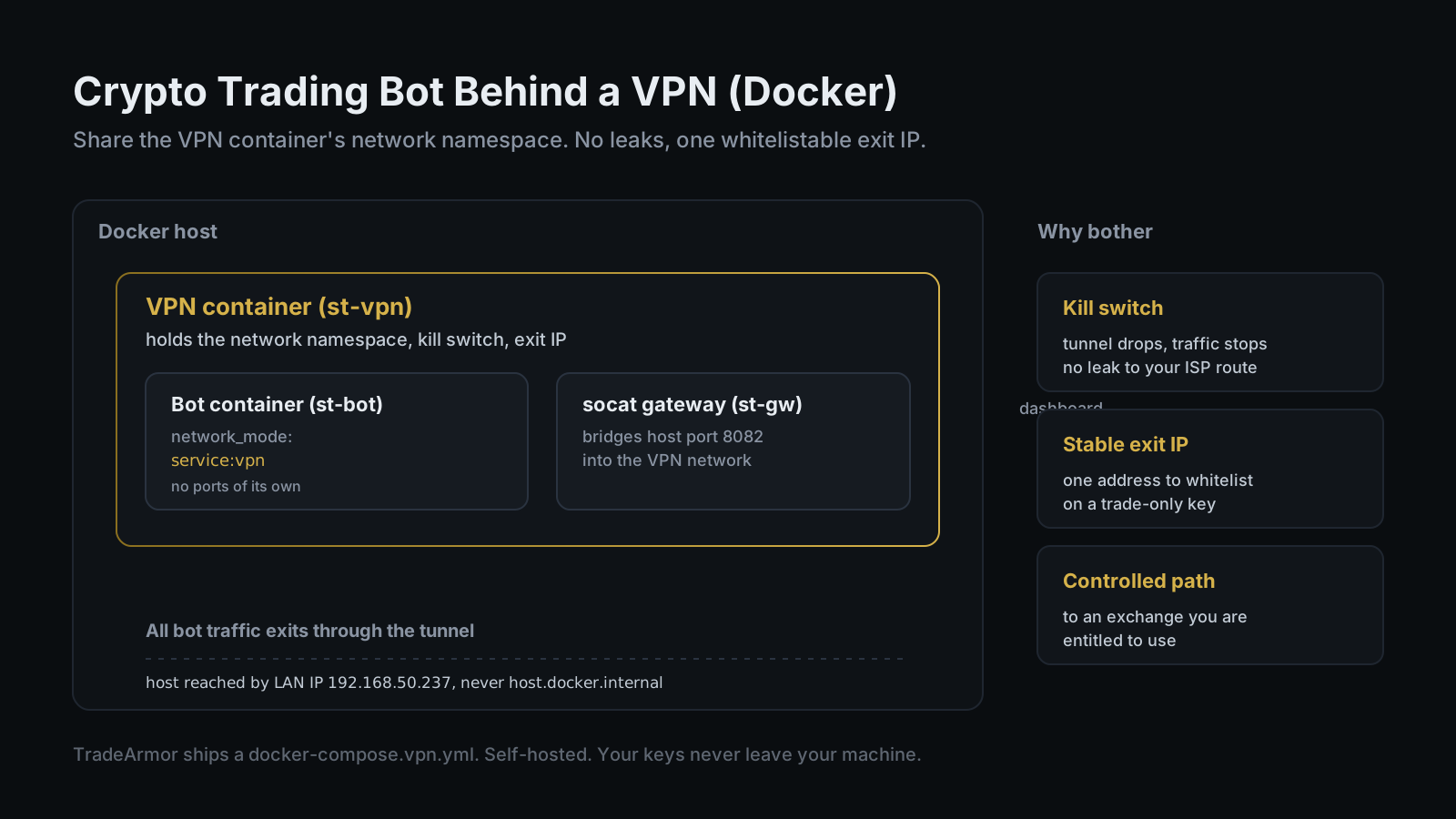
- Network isolation with a kill switch. A VPN container can be configured so that if the tunnel drops, all outbound traffic is blocked instead of leaking through the host's default route. Your bot simply stops talking to the exchange until the tunnel is back. For an unattended process holding trade permission on real money, a fail-closed network is a feature.
- A stable, whitelistable exit IP. Most exchanges let you lock an API key to specific IP addresses, and a key locked to one IP is dramatically safer than one that works from anywhere. A VPN gives the bot a single predictable egress address you can pin. This is the reason that matters most, and it is the one almost nobody mentions.
- A controlled path to an exchange you are entitled to use. If your ISP or a flaky route intermittently blocks or throttles the connection to an exchange you are legally allowed to trade on, a stable tunnel can make the difference between a bot that runs and a bot that times out at 3 a.m.
Privacy is a nice side effect. It is not the headline. The headline is isolation and a fixed address, and both are operational risk controls, which is the only kind of risk a bot can actually reduce.
Want to see the dashboard, the signals, and the strategy engine that run inside the container? See all features.
The container networking that actually works
There are a dozen ways to point a container at a VPN, and most of them leak. The one that does not is sharing a network namespace.
Docker has a mode where one container borrows another container's entire network stack. You run a VPN container first. Then you start the bot container with network_mode: "service:vpn", and the bot inherits the VPN container's interfaces, routes, and exit IP wholesale. Every request the bot makes leaves through the tunnel, because as far as the bot is concerned, the tunnel is its only network. There is no separate path for traffic to leak out of.
This is the same pattern the self-hosted crowd uses to put a download client or a media tool behind a VPN, and it is the pattern TradeArmor's docker-compose.vpn.yml is built on. The bot does not run on its own network and try to selectively route to the VPN. It runs inside the VPN container's network from the first second it boots.
Two consequences fall out of sharing a namespace, and they trip up almost everyone the first time.
First, the bot reaches the VPN container's services over localhost, because they are the same network. That part is convenient.
Second, any port you want to reach from outside, like the dashboard on port 8080, has to be published on the VPN container, not on the bot. The bot has no ports of its own to map. This is where people get stuck wondering why localhost:8080 shows nothing even though the bot is clearly running. The port is in the wrong place.
TradeArmor handles this with a small gateway. A socat process bridges a host port to the bot's port inside the VPN network, so you open the dashboard at localhost:8082 on the host and the traffic is relayed into the namespace where the bot actually lives. In the reference setup the containers are named st-vpn-8082 for the VPN, st-bot-vpn-8082 for the bot, and st-gw-8082 for the gateway. Three containers, one network identity, zero leaks.
The host.docker.internal gotcha (and the fix)
Here is the one that costs people an afternoon.
On a normal Docker bridge network, a container reaches the host machine through a special DNS name, host.docker.internal. It is convenient and it is everywhere in setup guides. The moment your bot shares a VPN container's network namespace, that name stops resolving. The VPN container does not carry the mapping, and the bot is now living on the VPN's network, not Docker's default bridge. So any config that points at host.docker.internal quietly breaks, and the error messages are not helpful about why.
The fix is unglamorous and reliable: reach the host by its actual LAN IP. In the reference TradeArmor setup, the bot talks to the host at 192.168.50.237 rather than the magic DNS name, and the VPN container's firewall is configured to allow that local subnet so the kill switch does not blackhole legitimate local traffic. If your home network hands out a different address, you check it with ifconfig or ip addr and use that. One line of config, and the bot can reach a proxy, a database, or another instance running on the host.
This is the kind of detail that separates a setup that ships from a setup that mostly works. A self-hosted bot is yours to run, which means the uptime is yours too. A Raspberry Pi in a drawer running this stack will outlast a laptop that sleeps when you close the lid. Ask me how I know.
If you are choosing hardware to host this on, the Raspberry Pi guide and the Mac mini 24/7 setup both cover the always-on side, and the trade-offs between a containerized and a bare-metal deployment are laid out in the self-hosted vs SaaS comparison.
A NordVPN example, start to finish
The concrete version, using NordVPN because it is what the reference setup is tested against. Any provider with a Docker-friendly client works the same way.
- Bring up the VPN container. It connects to your chosen NordVPN region and holds the tunnel. Give it a health check so the bot waits for the interface to be ready before it starts, otherwise the bot races the tunnel and loses.
- Configure the kill switch. Set the VPN container's firewall to allow only the subnets you need, your local LAN and the Docker VPN network, and to drop everything else if the tunnel is down. Fail closed. A bot that pauses is safer than a bot that trades over your naked ISP route.
- Start the bot with
network_mode: "service:vpn". Now the bot shares the tunnel. Confirm the exit IP by having the bot or a shell in its namespace hit an IP-echo endpoint. If it returns the NordVPN region's address and not your home address, the routing is correct. - Publish the dashboard port on the VPN container, or bridge it with the gateway. With TradeArmor's compose file the
socatgateway already does this, so the dashboard answers on the host port while the bot stays inside the namespace. - Point the bot at the host by LAN IP, not
host.docker.internal. Allow that subnet in the firewall. Restart. - Whitelist the exit IP on your exchange API key. This is the payoff. The key now only works from the VPN's address, and the key only ever needs read and trade permission, never withdrawal. The mechanics of that are in the API key security guide.
Because TradeArmor mounts its code and data as volumes, you do not rebuild the image for normal changes. You edit config or pull an update and run a container restart, and the running bot picks it up. The only time you rebuild is when the Python dependencies themselves change, which is rare. That is the difference between infrastructure you maintain and infrastructure that maintains you.
Troubleshooting the usual suspects
A short field guide to the failures you will probably hit.
The dashboard is blank but the bot logs look healthy. The port is published on the wrong container. Move the port mapping to the VPN container, or use the gateway. The bot has no ports of its own when it shares a namespace.
The bot cannot reach the host. You are still using host.docker.internal. Swap it for the host's LAN IP and allow that subnet in the VPN firewall.
Everything worked, then the tunnel reconnected and the bot went silent. Your kill switch is doing its job, and the bot is waiting for the tunnel. Add the health check and a restart policy so the bot reconnects cleanly when the VPN comes back, instead of sitting in a failed state.
The exit IP keeps changing. Some VPN providers rotate addresses. If you whitelist on the exchange, pick a provider or plan that gives you a static or dedicated IP, otherwise your whitelist invalidates every time the address moves and the bot starts getting rejected.
Two instances, one VPN, weird collisions. Run a VPN container per instance, or use the multi-instance proxy to fan signals to bots on separate tunnels. TradeArmor's proxy is designed for exactly this: one master receives a signal and forwards it to bots across machines, operating systems, and VPN tunnels, with per-instance delivery tracking so you can see which bot got what.
None of this turns the bot into a different product. The DCA engine with its unlimited levels and cost-basis gating, the 15 indicators, the hybrid and custom strategy modes, the bring-your-own-key AI strategy builder, the backtester, the tax exports: all of it runs identically inside the container. The VPN is plumbing. The platform is the platform.
FAQ
Why run a crypto trading bot behind a VPN? Three honest reasons. Network isolation with a kill switch, so the bot stops trading if the tunnel drops instead of leaking onto your bare ISP route. A stable exit IP you can whitelist on your exchange API key, which is the strongest reason and the one most people skip. And a controlled network path to an exchange you are legally entitled to use. A VPN does not get you around KYC, so this is about isolation and control, not evasion.
Does running a trading bot through a VPN violate the exchange's terms of service? It can. Using a VPN to reach a market your verified KYC region is barred from usually violates the terms and can freeze an account. Using one for privacy, isolation, or a stable whitelisted IP on an exchange you are allowed to use is different. Read your exchange's terms first.
How do I route a Docker container's traffic through a VPN container?
Run a VPN container, then start the bot with network_mode: "service:vpn". The bot shares the VPN container's network namespace, so all its traffic leaves through the tunnel. Publish any host-facing ports on the VPN container, not the bot.
Why can't my bot reach host.docker.internal behind a VPN? Because sharing the VPN container's namespace removes Docker's default-bridge DNS mapping. Reach the host by its LAN IP instead, and allow that subnet in the VPN firewall so the kill switch does not block it.
Can TradeArmor run in Docker behind a VPN out of the box?
Yes. It ships a docker-compose.vpn.yml with a VPN container, a socat gateway, and volume-mounted code and data. It is tested with NordVPN. Docker plus VPN support is on the Enterprise tier.
The bottom line
Running a crypto trading bot behind a VPN is two problems, not a weekend: get the container's traffic into the tunnel without leaks, and let the bot still reach the host and the exchange it needs. Share the VPN container's network namespace, publish ports in the right place, reach the host by LAN IP, and whitelist the exit address on a trade-only key. TradeArmor ships that whole setup as a docker-compose.vpn.yml, and the same platform that runs inside the tunnel gives you built-in signals, 15 indicators, a bring-your-own-key AI strategy builder, DCA, grid, futures, copy trading, backtesting, and tax reporting, all on hardware you control where your keys never leave your machine. Own the network, own the keys, and let the bot do the boring part. See the plans and get started.