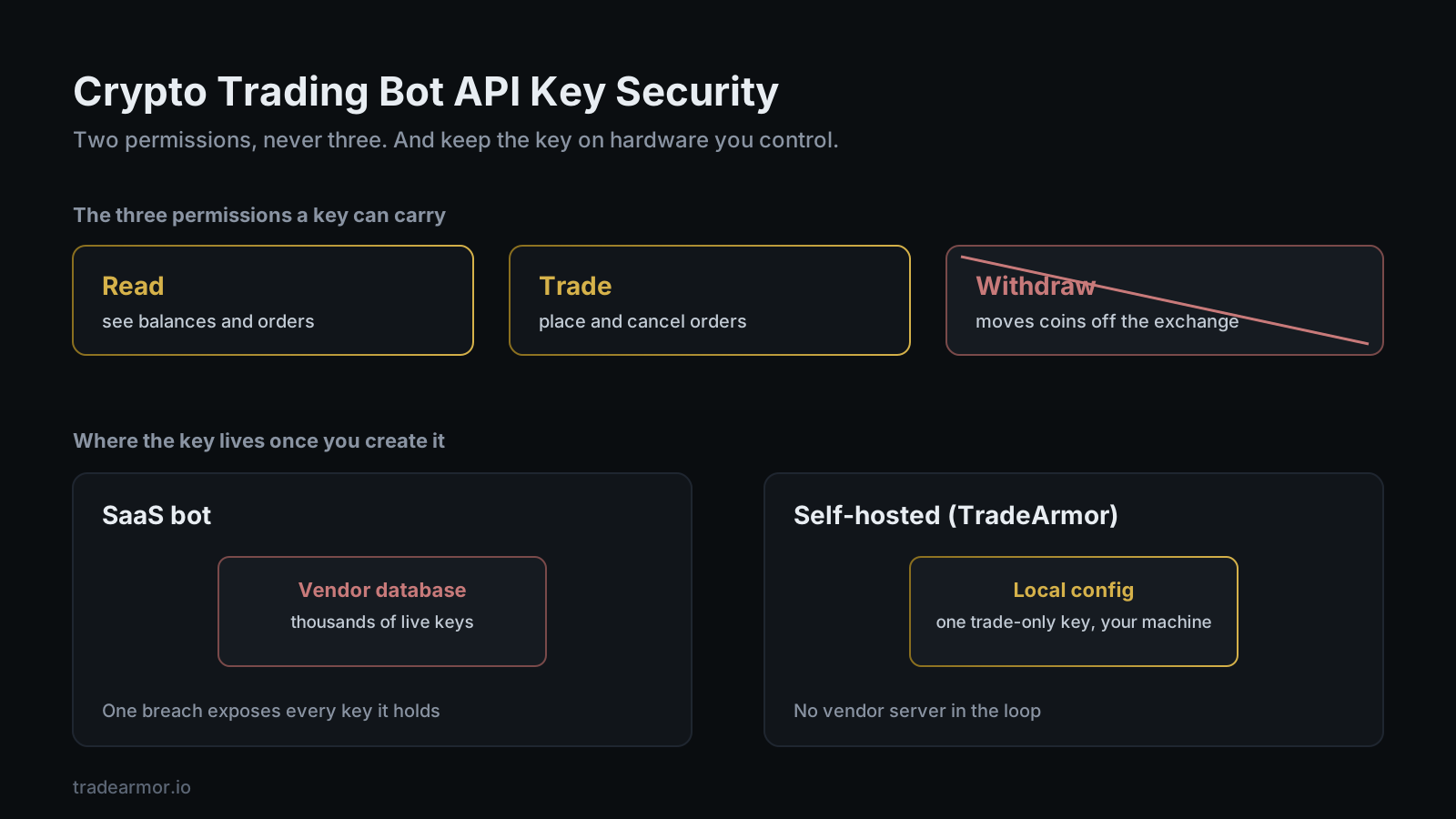
You have a bot you want to run, and the setup guide just told you to create an exchange API key. Now you are staring at a page of permission checkboxes with no clear sense of which ones are safe and which ones quietly hand a stranger the keys to your account. "I don't want to give my API keys to a third party" is the instinct, and it is the correct one. The problem is that most guides skip straight past it. They tell you to tick the boxes that make setup easiest, not the ones that keep your money where it is.
So this is the guide that does the opposite. Crypto trading bot API key security is not complicated once you understand what an API key actually is and what each permission lets the holder do. It comes down to two questions: which permissions the key carries, and where the key lives once you create it. Get those two right and a leaked key is an annoyance instead of a disaster. Get them wrong and you are one breach away from an empty account.
TradeArmor exists because of the second question. It is a self-hosted crypto trading platform: built-in BTC/USDC signals with a multi-year live track record, 15 real-time technical indicators, a plain-English AI strategy builder, plus DCA, grid, futures, copy trading, backtesting, paper trading, and tax reporting, all running on your own hardware where your API keys never leave your machine. That last clause is the entire point of this article. The keys stay in local config on the box you control, and the bot only ever asks for trade permission, never the permission that moves coins.
What an exchange API key actually is
An API key is a username and password for software. Instead of you logging into the exchange and clicking buttons, you generate a key pair, a public key and a secret, and hand it to a program so it can act on your account through the exchange's API. That is how every trading bot works, SaaS or self-hosted. There is no bot on earth that trades for you without one.
The key is not your login. You cannot withdraw the exchange password from it, you cannot change account settings with it, and it does not grant access to your email or your two-factor codes. What it grants is exactly the set of permissions you tick when you create it. That set is the whole game.
The three permissions every API key carries
An exchange API key carries three families of permission. Two of them are fine. The third is the one that drains accounts.
Read. This lets the holder see your balances, your open orders, and your trade history. It is harmless on its own. A read-only key cannot place a trade or move a coin. Portfolio trackers and tax tools often ask for read-only access, and that is the right scope for them.
Trade. This lets the holder place and cancel orders on your behalf. It is the permission a bot genuinely needs, because executing trades is the job. A trade-enabled key can buy and sell within your account, but the coins stay on the exchange. It cannot send them anywhere.
Withdraw and transfer. This lets the holder move funds off the exchange to an external wallet or another account. No trading bot needs it. None. A bot's job ends at placing the order; getting your coins out of the exchange is something only you should ever do, from your own logged-in session with your own two-factor check.
That is the rule the rest of this article hangs on. Read and trade, never withdraw. "I'm not putting withdrawal permissions on this" should be the first decision you make, before you even pick a bot.
The trade-only rule, and the guides that break it
Here is where the industry earns its reputation. Some setup guides tell you to enable more than trade permission, framed as making the process smoother or avoiding errors later. Withdrawal permission is the one your setup guide should never ask for, and the one a surprising number of them ask for anyway, to be safe. Read that phrase again. The word "safe" is pointed in exactly the wrong direction.
A key with withdrawal permission is not a convenience feature. It is the difference between a leaked key that costs you a few unwanted trades and a leaked key that empties your account to an address you will never recover from. If a product, a guide, or a support agent ever tells you a bot needs withdrawal access to function, that is the moment to close the tab.
TradeArmor needs trade permission and nothing more. We wrote the longer version of this argument in why you should never give a bot withdrawal permission, and the short version of what a bot can and cannot do with your key lands on the same line: a trade-only key cannot withdraw, full stop, no matter who holds it.
IP whitelisting: the second lock
Permissions decide what a key can do. IP whitelisting decides where it can do it from.
An IP whitelist, sometimes called an IP access restriction, tells the exchange to reject any API request that does not arrive from an address you approved in advance. If your bot runs from a fixed IP, a home server, a VPS, or a static address, you whitelist that one address and the key becomes useless from anywhere else. A leaked key with no IP restriction works from any laptop on the planet. The same key locked to your server's IP works from exactly one machine: yours.
Two exchange-specific quirks are worth knowing before they bite you. Binance expires API keys after 30 days if they have no IP restriction set, and it will not enable withdrawals on a key at all until a whitelisted IP is attached (Binance.US documents both rules in its API best-practices guide). That second rule is the exchange agreeing with the entire premise of this article: withdrawal access is dangerous enough that it wants a hard IP lock before it will turn it on. We are simply suggesting you never turn it on in the first place.
If your bot runs behind a VPN or in a Docker container with a changing exit IP, whitelisting takes a little more setup, and the self-hosted infrastructure guide covers how to give a containerized bot a stable address. It is worth the effort. Two locks beat one.
Want to see the dashboard, the signals, and the strategy engine that run on a trade-only key? See all features.
Where your key actually lives: the question nobody asks
Permissions and IP rules limit the damage a leaked key can do. But the bigger question, the one that separates the entire category, is where the key sits once you create it.
A SaaS bot has to store your API key on its servers. That is not a flaw in any one product; it is how the model works. The bot runs in the vendor's cloud, so the key has to live in the vendor's database for the cloud to trade for you. One company, one database, holding live exchange keys for thousands of customers. Attackers call that a target. The vendor's marketing calls it convenience.
We are not speaking hypothetically. In December 2022, the SaaS bot platform 3Commas confirmed that roughly 100,000 customer API keys had been exposed, with traders reporting around $22 million in losses, and the keys spanned multiple major exchanges (BleepingComputer's report on the incident). The single most common reaction in the aftermath, repeated across forums for months, was a version of "3Commas got hacked and I'm never touching a SaaS bot again." That reaction is the rational one. When you ask "why would I trust a server I don't control with trade permissions on a meaningful amount of crypto," the honest answer is that you should not have to.
A self-hosted bot inverts the model. The key sits in a local config file on your own machine, and the bot reads it from there. There is no vendor database holding it, because there is no vendor server in the loop. The attack surface shrinks to whatever your own machine is, and a breach of the company you bought the software from exposes nothing, because the company never had your key. That is the structural reason crypto trading bot API key security is a different conversation on a self-hosted bot than on a SaaS one. The permissions checklist is the same. The storage location is not.
Key rotation and the red flags
Two habits round out the picture.
Rotate your keys on a schedule. Every three to six months is a reasonable cadence for an active trading key, and you should rotate immediately after anything that could have exposed it: a machine you sold, a server you tore down, a screenshot you posted with a config visible in the corner, or news that a service you connected to was breached. On a self-hosted bot rotation is trivial. You generate a fresh key on the exchange, paste it into local config, restart the bot, and delete the old key from the exchange. Nothing else is holding a copy to forget about.
And learn the red flags. A bot that requires withdrawal permission to function. A setup flow that pushes you to enable every permission "for compatibility." A platform that cannot tell you, plainly, where your key is stored and who can read it. A product that treats the question of custody as a support ticket rather than a headline. Any one of those is a reason to walk. The serious tools have a clear answer to where your key lives, and they lead with it.
A crypto trading bot API key security checklist, per exchange
The exact labels differ by exchange, but the moves are the same everywhere. When you create a key for any bot, do this:
- Enable read and spot trading permission only. Leave withdrawal and transfer disabled. On most exchanges, including Binance US, Coinbase, and Bybit, withdrawal is off by default on a new key, so this is often a matter of not touching it.
- Skip futures or margin scope unless you actually run leveraged strategies, and even then enable only the specific contract type you trade.
- Attach an IP whitelist if your bot runs from a stable address. Lock the key to that one IP.
- Store the secret somewhere you control, paste it into your bot's local config, and never paste it into a chat, a ticket, or a screenshot.
- Label the key by purpose so you know which bot uses it when it is time to rotate.
- Set a calendar reminder to rotate it in three to six months.
Six steps, and the first one does most of the work. A trade-only key, locked to your IP, stored on your own machine, is about as safe as an API key gets. That is the configuration TradeArmor is built around, and it is the configuration you should demand from any bot, self-hosted or not.
None of this reduces the platform to a security checklist, either. The whole reason to run a bot is the 20-level DCA engine with cost-basis gating, the 15 indicators feeding custom and hybrid strategies, the built-in signals with a multi-year track record, the grid bot, futures, copy trading, backtesting, paper trading, and one-click tax exports. Crypto trading bot API key security is the foundation those features stand on. It is not the building. But a building on a bad foundation is the one that falls down, and in this category the foundation is a checkbox most people tick without reading.
FAQ
What permissions should a crypto trading bot API key have? Two: read and trade. Read lets the bot see balances and order history. Trade lets it place and cancel orders. That is the full set a bot needs. It should never have withdrawal or transfer permission, because a key that cannot move coins off the exchange cannot drain your account even if it leaks.
Can a trading bot steal my funds with a trade-only API key? It cannot transfer coins out, because a trade-only key has no withdrawal scope. The worst a leaked trade-only key can do is place unwanted trades, which is why IP whitelisting matters as a second layer. The real theft risk comes from withdrawal-enabled keys and from SaaS platforms storing thousands of keys in one database.
Is crypto trading bot API key security different on a self-hosted bot? Yes, on where the key lives. A self-hosted bot stores your key in local config on your own machine, so there is no vendor database to breach. A SaaS bot stores your key on its servers, so one breach exposes every key it holds. TradeArmor is self-hosted and only needs a trade-only key.
Should I use IP whitelisting on my exchange API key? If your bot runs from a stable IP, yes. It tells the exchange to reject any request from an address you did not approve. Note that some exchanges, including Binance, expire keys after 30 days without an IP restriction and require a whitelisted IP before enabling withdrawals.
How often should I rotate my trading bot API keys? Every three to six months for an active key, and immediately after anything that could have exposed it. Rotation is simple on a self-hosted bot: generate a new key, paste it into local config, restart, and delete the old one.
The bottom line
Crypto trading bot API key security is two decisions, not twenty. Give the key read and trade permission and nothing else, and keep the key on hardware you control instead of a server you do not. TradeArmor is the self-hosted answer to both: a full platform with built-in signals, 15 indicators, a bring-your-own-key AI strategy builder, DCA, grid, futures, copy trading, backtesting, and tax reporting, all running where your trade-only key never leaves your machine and could not withdraw if it did. Set the permissions right, hold your own keys, and let the bot do the boring part. See the plans and get started.