You picked a bot, you are ready to connect it, and the exchange just dropped you on a page of API permission checkboxes with no explanation of which ones are safe. The correct exchange api permissions for a trading bot are nearly identical everywhere, but no exchange bothers to tell you that. Worse, every exchange labels them differently. Binance US calls it one thing, Kraken splits it into four, OKX bolts on a passphrase you have never heard of. "I don't want to give my API keys to a third party" is the right instinct, but the checkbox page does not tell you which boxes honor it. So people tick everything, or they follow a guide that tells them to tick everything, and they hand a stranger more access than a bot could ever need.
This is the per-exchange map that page should have come with. The exchange api permissions for a trading bot are simpler than the interface makes them look, and they are almost identical everywhere once you translate the labels. Get them right and a leaked key is an annoyance. Get them wrong and it is an empty account. "I'm not putting withdrawal permissions on this" is the entire security posture, and this guide shows you exactly where that switch lives on six major exchanges.
TradeArmor is why the distinction matters. It is a self-hosted crypto trading platform: built-in BTC/USDC signals with a multi-year live track record, 15 real-time technical indicators, a plain-English AI strategy builder, plus DCA, grid, futures, copy trading, backtesting, paper trading, and tax reporting, all running on your own hardware where your API keys never leave your machine. Because the bot runs on your box, the key you create here sits in local config that you control, not in a vendor cloud. The permissions still matter, and this guide is how you set them.
The one rule behind exchange API permissions for a trading bot
Before the exchange-by-exchange steps, the rule that does not change no matter whose interface you are in.
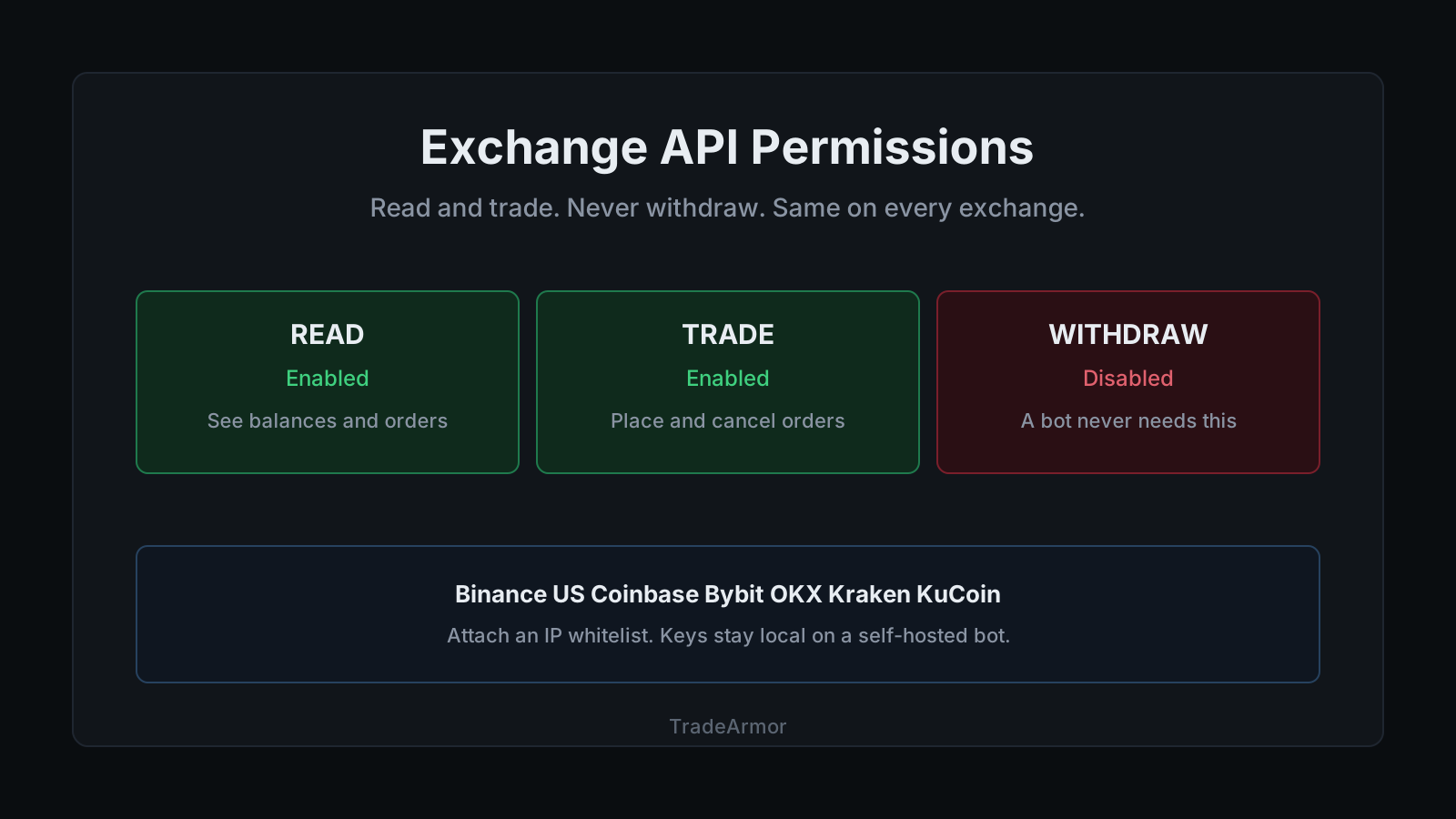
An exchange API key can carry three families of permission. Read lets the holder see balances and history. Trade lets the holder place and cancel orders. Withdraw lets the holder move funds off the exchange. A bot needs the first two and never the third. That is the whole policy. We wrote the long version in the API key security guide, and the shorter answer to the underlying fear lives in can a trading bot withdraw my funds: a trade-only key cannot, because the scope that moves coins is one you never enabled.
The second universal move is an IP whitelist. Permissions decide what a key can do; the whitelist decides where it can do it from. If your bot runs from a stable address, a home server, a VPS, or a fixed IP, you lock the key to that one address and it stops working from anywhere else. On several exchanges the whitelist is also what keeps the key from expiring, which we will get to.
Now the labels, exchange by exchange.
Binance US
Create the key under API Management in your account settings. Binance US disables withdrawal on a new key by default, so the safe configuration is largely a matter of not turning things on. Enable spot trading and reading, leave withdrawals off, and attach your IP.
Two Binance-specific rules are worth knowing before they surprise you. A key with no IP restriction expires after 30 days, and the exchange will not enable withdrawals on a key at all until a whitelisted IP is attached (Binance.US documents both in its API best-practices guide). The second rule is the exchange agreeing with the entire premise of this article. Withdrawal access is dangerous enough that Binance wants a hard IP lock before it will even offer it. We are just suggesting you never reach for it. If you run on Binance US, the Binance US trading bot guide covers the connection end to end.
Coinbase Advanced Trade
Coinbase moved key creation into its Developer Platform, and the permission names are refreshingly plain: View, Trade, and Transfer. Enable View and Trade. Leave Transfer off, because Transfer is the one that covers withdrawals and deposits, the scope no bot should hold (Coinbase documents the permission set in its Advanced Trade API reference).
One Coinbase quirk catches people: the key credentials come as a downloadable file that is shown exactly once at creation. Save it somewhere you control the moment it appears. If you lose it, there is no recovery screen, only the delete-and-recreate path. The Coinbase trading bot guide has the rest of the setup.
Want to see the dashboard, the signals, and the strategy engine that all run on a trade-only key? See all features.
Bybit
Create the key under Account then API Management. New Bybit accounts wait 48 hours before the option appears, which is mildly annoying the day you want to start and completely forgotten a week later. Choose HMAC authentication, enable the read and trade scopes for Unified Trading, and leave withdrawal disabled.
Bybit expires a key that has no IP whitelist after three months, so attaching your server IP is not just a security step, it is what keeps the key alive. Note a 2026 change worth flagging: since February 10, 2026, the IP whitelist on a master key can only be edited in the browser, not through the API itself, so plan to set it correctly at creation (Bybit's API key documentation covers the whitelist and expiry rules). If Bybit is your venue, the Bybit trading bot guide walks the full connection.
OKX
OKX adds a third credential most first-timers do not expect: a passphrase you set yourself at creation, on top of the API key and the secret. Your bot needs all three. The permission names are Read, Trade, and Withdraw. Enable Read and Trade, leave Withdraw off.
OKX lets a single key bind up to 20 IP addresses, and it expires a key that carries trade permission but has no IP bound after 14 days of inactivity (OKX documents the IP binding and expiry behavior in its API FAQ). Two takeaways: bind your IP so the key does not silently die, and remember that the passphrase, like the secret, is shown once and cannot be recovered later. The OKX trading bot guide covers the rest.
Kraken
Kraken is the exchange that turns three permissions into a longer menu, which looks intimidating and is actually the most honest of the set, because it makes you say exactly what the key can do. For a bot you enable Query Funds, so it can read balances, Query Open Orders and Trades and Query Closed Orders and Trades, so it can see its own positions, and Create and Modify Orders, so it can trade. You leave Withdraw Funds unchecked, because a key that only places orders has no business moving money (Kraken documents each permission in its API key guide).
Kraken's own security guidance is blunt and correct: lock the key to the IP addresses your system runs from, and use a separate key per purpose so that if one leaks, the blast radius is contained. That is the whole discipline in one sentence.
KuCoin
KuCoin follows the OKX pattern: a passphrase set at creation alongside the key and secret, permission scopes for General reading and Spot trading, and an IP whitelist option you should use. Enable General and Spot, leave any transfer or withdrawal scope off, and set the passphrase somewhere you control.
One honest note specific to KuCoin. Its US availability has been restricted following regulatory action, so confirm you can legally and practically connect from your location before you build a workflow around it. The KuCoin trading bot guide covers that situation head-on. The permission discipline, though, is identical to every other exchange on this page: read and trade, never withdraw.
The two traps that repeat on every exchange
Across all six, the same two mistakes account for most of the support tickets.
The first is the expiring key. Bybit, OKX, and Binance US all expire keys that lack an IP whitelist, on different timers. People create a key, skip the IP step because it seems optional, and then their bot silently stops trading weeks later with no obvious cause. Attach the IP at creation and the problem never exists. It is the rare security measure that also solves a reliability problem.
The second is the one-time credential. Coinbase hands you a file once. OKX and KuCoin show the secret and set the passphrase once. Bybit shows the secret once. There is no "view secret again" button anywhere, by design, because a credential a server can re-display is a credential a breach can re-steal. Copy everything into your bot's local config the moment it appears, and store your own copy somewhere private. Not a chat, not a ticket, not a screenshot posted to ask why the bot will not connect.
Where the key lives matters more than the checkboxes
You can set every permission perfectly and still be exposed, because the checkboxes limit what a key can do, and they say nothing about where the key sits after you create it.
A SaaS bot has to store your key on its servers. That is not a flaw in one product, it is how the model works: the bot runs in the vendor's cloud, so the key has to live in the vendor's database for the cloud to trade for you. One company, one database, live exchange keys for thousands of customers. In December 2022, the SaaS platform 3Commas confirmed roughly 100,000 customer API keys were exposed, with traders reporting around $22 million in losses across multiple exchanges (BleepingComputer reported the incident). Every one of those keys was, on paper, correctly scoped. The scoping did not matter, because the storage did.
A self-hosted bot inverts that. The key sits in a local config file on your own machine, the bot reads it from there, and there is no vendor server in the loop to breach. The attack surface shrinks to whatever your own hardware is. That is the structural reason a self-hosted setup changes the security conversation, and the full comparison of self-hosted versus SaaS walks the trade-offs in detail. Set the exchange api permissions for a trading bot to read and trade on any exchange you like. Then ask the harder question of who is holding the key once you are done, because that answer is the one that actually protects the account.
None of this narrows TradeArmor to a permissions form, either. The reason to run the bot is the 20-level DCA engine with cost-basis gating, the 15 indicators feeding custom and hybrid strategies, the built-in signals with a multi-year track record, the grid bot, futures, copy trading, backtesting, paper trading, and one-click tax exports. Correct exchange api permissions for a trading bot are the foundation the whole platform stands on. They are not the platform. They are the checkbox most people tick without reading, on the page this guide exists to explain.
FAQ
What exchange API permissions does a trading bot need? Two scopes: read and trade. Read lets the bot see balances and order history. Trade lets it place and cancel orders. The exchange api permissions for a trading bot should never include withdraw or transfer, because a key that cannot move coins off the exchange cannot drain the account even if it leaks.
Do I enable withdrawal permission for my trading bot on any exchange? No. Not on Binance US, Coinbase, Bybit, OKX, Kraken, or KuCoin. A bot's job ends at placing an order. Moving funds off the exchange is something you do yourself, from your own logged-in session. If a guide tells you to enable withdrawal to make setup smoother, use a different guide.
Why do Bybit and OKX API keys expire? Both expire keys that carry trade permission but have no IP whitelist attached, Bybit after three months and OKX after 14 days of inactivity. Attach your bot server's IP address to the key. A whitelisted key does not expire on that timer and is far safer.
What is the passphrase on OKX and KuCoin keys? A third credential you set at creation, on top of the key and secret. Your bot needs all three. It is shown or set once and cannot be viewed again, so store it in local config where you control it.
Are exchange API permissions different on a self-hosted bot? The checkboxes are identical. What differs is where the key lives after you tick them. A self-hosted bot keeps the key in local config on your machine. A SaaS bot stores it on its servers, which means one breach exposes every key it holds.
The bottom line
The exchange api permissions for a trading bot are read and trade, on every exchange, forever. Withdraw stays off. Attach an IP whitelist so the key both survives and stays useless to anyone else. Save the one-time credentials the instant they appear. Those four moves are the same on Binance US, Coinbase, Bybit, OKX, Kraken, and KuCoin, no matter how differently each one labels the checkboxes. TradeArmor is the self-hosted answer to the part the checkboxes cannot fix: a full platform with built-in signals, 15 indicators, a bring-your-own-key AI strategy builder, DCA, grid, futures, copy trading, backtesting, and tax exports, all running where your trade-only key never leaves your machine. Set the permissions right, hold your own key, and let the bot do the boring part. See the plans and get started.