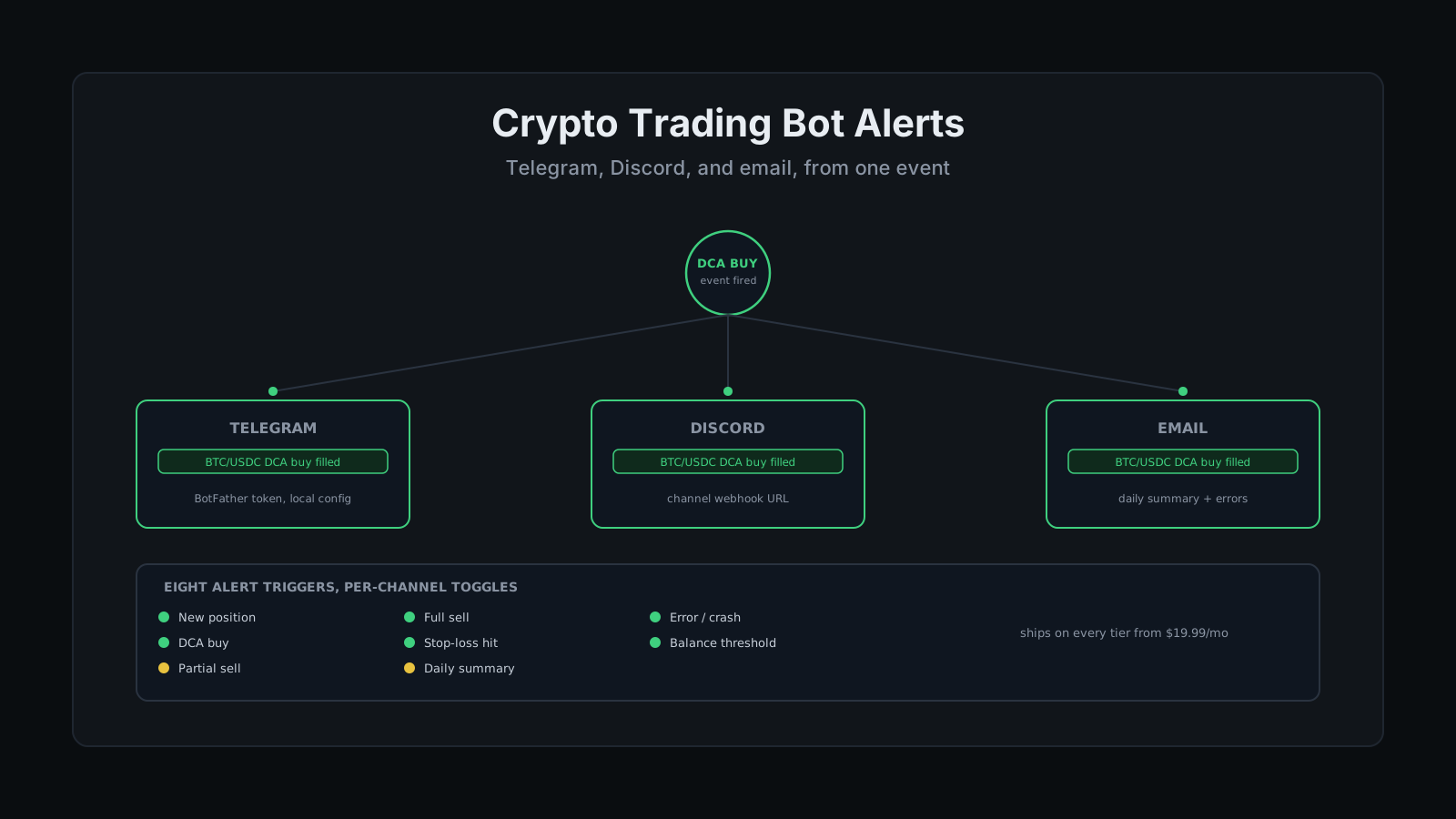
A trade fills at 2:47 PM on a Tuesday. You find out at 6, when you finally sit down at a laptop, because the bot doesn't know you have a job that doesn't let you babysit a chart between meetings. The trade was fine. The DCA level filled exactly where it was supposed to. The only thing that actually went wrong is that you spent four hours not knowing that.
That gap is the entire case for crypto trading bot alerts, and it has nothing to do with strategy. "I don't trust a black box" is usually said about the trading logic itself, but a bot that runs your rules perfectly and never tells you what it's doing feels exactly like one anyway. The fix isn't a smarter indicator. It's a message that shows up on your phone the moment something actually happens.
I've traded through TradeArmor for three years now, self-hosted on a machine I control end to end, with 15 real-time indicators, a plain-English AI strategy builder, and DCA, grid, futures, copy trading, backtesting, paper trading, and tax exports all living on that same engine. Alerts sit on top of all of it: three channels, eight trigger types, and zero requirement to have the dashboard open to know what your account just did. See how the full engine fits together before you decide which channel fits how you actually check your phone.
Crypto Trading Bot Alerts: The Eight Triggers That Fire
TradeArmor ships eight distinct alert triggers, and each one can be switched on or off independently, per channel, so a Telegram feed meant for a quick glance doesn't have to carry the same noise as an email inbox you actually read end to end.
The eight: new position opened, DCA buy filled, partial sell, full sell, stop-loss hit, daily summary, error or crash, and balance threshold crossed. That last one is the same reserve-balance mechanic covered in how Keep Balance protects your account, and it's worth enabling on its own even if you mute everything else, since it's the one alert that tells you the account is running low on the cash it isn't allowed to spend.
Most people don't want all eight firing at once. A channel with every trigger enabled turns into background noise within a week, and background noise gets muted, which defeats the entire point. Full sell, stop-loss hit, and error/crash cover the events that actually change your risk. DCA buy and partial sell are useful if you want texture on how a ladder is filling. New position and daily summary are the ones most people turn off first.
Setting Up Telegram Alerts
Telegram is the fastest of the three to wire up because the setup lives entirely inside an app you already have open. Message @BotFather, run /newbot, pick a display name and a username ending in "bot," and Telegram hands back an API token, the same flow Telegram's own Bot API documentation walks through for any bot, not just a trading one. Telegram's entire bot ecosystem runs on a chat with an account literally named BotFather, which is either the platform's best design decision or its funniest, and nobody at Telegram has ever clarified which. That token goes into your TradeArmor config, not your personal Telegram login, which is a distinction worth sitting with for a second: the bot never touches your account credentials, only a token scoped to messages sent through that one bot.
Treat the token like the password it functionally is. Anyone holding it can send messages as that bot into whatever chat it's connected to. That's a real thing to guard, but it's a smaller blast radius than an exchange API key. A leaked Telegram token gets someone posting spam into your alerts channel. A leaked exchange key with the wrong permission gets someone trading, or worse, withdrawing, on your account. The two are not the same category of secret, and the API key security guide covers the one that actually matters for your funds.
Setting Up Discord Webhook Alerts
Discord alerts run on the same mechanism half of self-hosted software already uses: a webhook. Open Channel Settings inside the server you want alerts in, go to Integrations, create a webhook, and copy the URL it generates. Paste that URL into TradeArmor's config and every enabled trigger posts directly into that channel, formatted the same way any other webhook-fed bot (uptime monitors, CI pipelines, GitHub activity) already posts into channels you probably have open right now.
A webhook URL is a bearer credential the same way the Telegram token is: whoever has it can post into the channel, nothing more. It's not tied to your Discord login and it can't read anything outside that one channel's incoming messages. Rotate it if it ever ends up somewhere public, the same rule as any other secret you'd rather not explain later.
Email Notifications: The Fallback Channel
Email is the least immediate of the three and the most reliable for the alerts you actually want a permanent record of. Daily summaries make more sense as an email you can search later than as a chat message that scrolls past in an hour. Every trader ignores a daily summary the week it arrives and reads it closely the one week they actually needed to, which is less a design flaw than a law of nature. Error and crash alerts belong on every channel you have configured, since that's the one trigger where redundancy is the entire point: if the bot crashed, you want to know from whichever channel you happen to check first.
See the full plans and configure your alert channels once you've decided which combination fits your actual phone habits, since all three ship on every tier starting at $19.99/mo. Plenty of SaaS bots treat richer notification channels as an upsell lever. TradeArmor ships all three on Starter because withholding a text message isn't a feature, it's a reason to open a ticket.
Alerts vs. Remote Access: Two Different Problems
Alerts and remote access get lumped together constantly, and they solve opposite halves of the same complaint. An alert is a one-way push: the bot tells you something happened, past tense, no action required to receive it. Remote access, covered in how to reach the dashboard from outside your home network, is what lets you actually get to the live Positions page and change something.
A setup with alerts but no remote access still leaves you stuck: you know the stop-loss hit, but you're on a phone with no way to look at the account and decide what's next. A setup with remote access but no alerts means you only ever find out something happened by remembering to go check. You want both, for the same reason you want the DCA buy gate and Keep Balance running together instead of picking one.
What Alerts Won't Do
An alert tells you what happened. It doesn't tell you why, at least not in the one-line version that shows up on your phone. For the mechanics behind that one line, how the execution engine actually decides what to trade is a deeper read than any notification will ever be, and the Positions page's rules inspector breaks the fired condition down further still: which DCA level, which EQ-price test, which sell rule. Show me the rules it's following, not just the result, is the standing answer to anyone who wants more than a notification.
Alerts also don't turn into approval gates. A daily summary is a report, not a request for permission, and a full-sell notification arrives after the position closed, not before. Signals are algorithmic outputs, not personalized investment advice, and no notification channel changes that. Past performance of any signal, indicator, or backtest referenced anywhere on this site does not indicate future results. What alerts actually buy you is the same account oversight you'd have from staring at the dashboard all day, minus the part where you have to actually do that.
TradeArmor is the self-hosted engine behind every one of those eight triggers, running on hardware you own, with the same three-year signal track record, 15 indicators, AI strategy builder, and DCA, grid, futures, copy trading, backtesting, paper trading, and tax exports on one subscription. Set up your alert channels and see the rest of the platform.