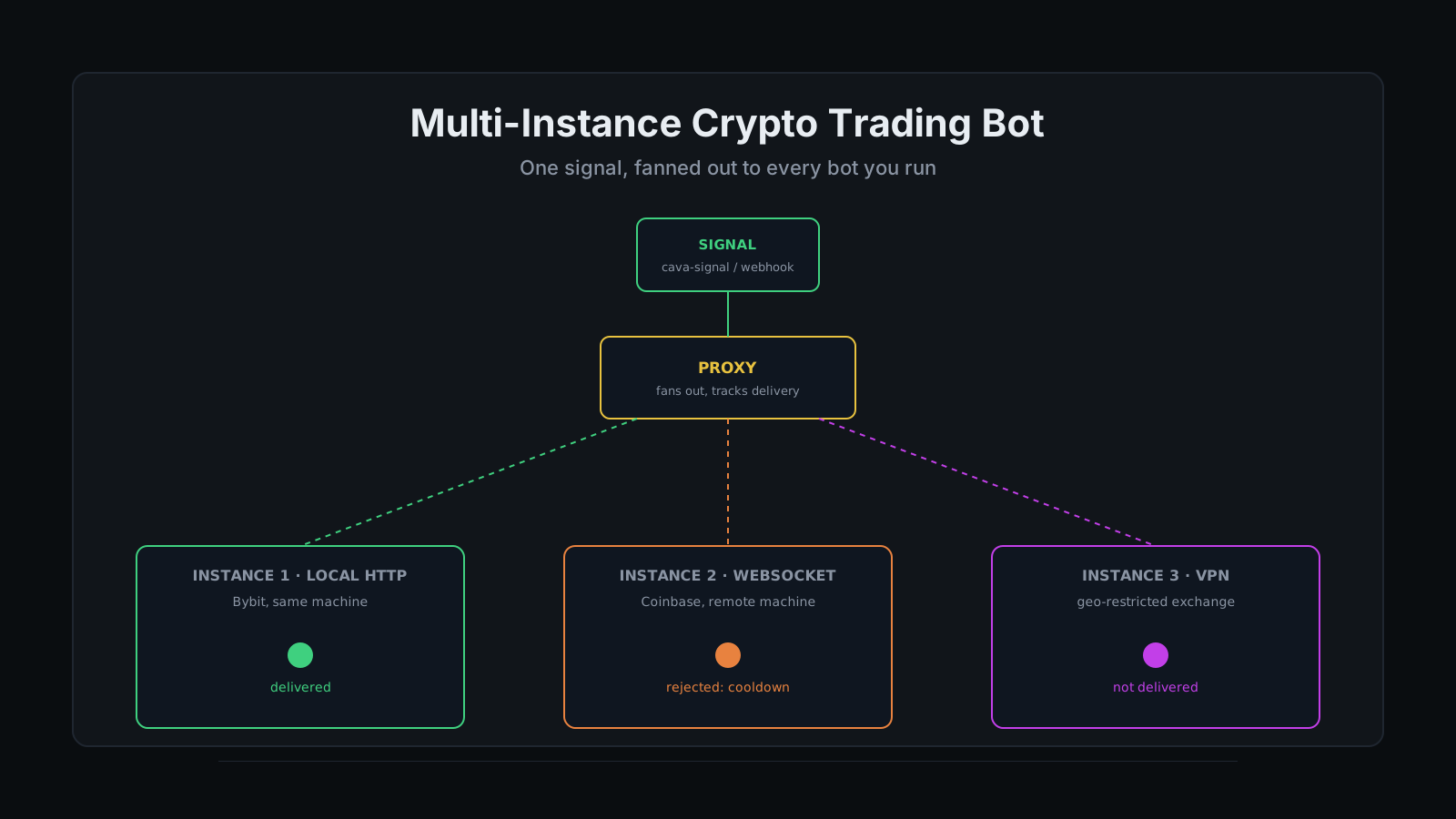
A signal only fires once. Whether that single event turns into one trade or five depends entirely on what is listening on the other end, and for most traders running more than one exchange account, "what is listening" is a person, copy-pasting the same entry into a second browser tab before the first one fills. A multi-instance crypto trading bot solves that by letting one signal reach every bot you have registered, automatically, the moment it fires. The strategy was never the hard part. Getting the same decision executed on Bybit and Coinbase within the same few seconds, without babysitting two dashboards, is.
Most bot subscriptions treat a second exchange account like an upgrade instead of an architecture decision, exactly the kind of friction a self-hosted crypto trading bot is supposed to remove, not relocate to a pricier tier. Every feature is behind another upgrade tier, and running the same strategy on a second exchange usually means a second subscription, a second dashboard, and a second copy of your API keys sitting on a second vendor's server. "My main exchange is Bybit but I also want to run on Coinbase for the tax reporting" is a completely ordinary thing to want and a strangely annoying thing to actually set up once a SaaS bot gates a second connection behind a higher tier.
TradeArmor is the bot I run day to day: self-hosted, on hardware I own, backed by a three-year live BTC/USDC signal record, 15 real-time indicators, a plain-English AI strategy builder, and DCA, grid, futures, copy trading, backtesting, paper trading, and tax exports on one engine. A multi-instance crypto trading bot is what that setup becomes the moment you register a second bot with the proxy: one signal, however many instances you have told it about. See the full engine here before we get into how the fan-out actually works.
What a Multi-Instance Crypto Trading Bot Actually Means
One bot in this context is one running process with its own exchange connection, its own DCA settings, and its own local API key. A multi-instance crypto trading bot is a small cluster of those processes that all listen to the same signal source through a proxy, so a single cava-signal or a single TradingView webhook can trigger a coordinated response across every instance instead of one.
The master bot runs that proxy, on a fixed local port, and it is the only piece that knows about every registered instance. Individual bots do not talk to each other directly. They talk to the proxy, and the proxy talks to them, which keeps the architecture simple even as the number of instances grows from two to ten.
How the Signal Actually Reaches Every Instance
The proxy handles delivery two different ways depending on where the receiving instance lives.
Instances on the same local network get the signal over a plain HTTP push, carrying a trusted-source header the receiving bot checks before accepting it, so a signal forwarded by your own proxy skips the redundant step of re-validating a webhook token it already trusts. Instances running somewhere else entirely, a different machine, a different operating system, or a box sitting behind a VPN tunnel for a geo-restricted exchange, get the same signal pushed over a persistent WebSocket connection instead. Both delivery paths land in one signal log, with a status per instance, so a signal that reached four out of five bots shows exactly which one it missed and why.
Nothing about a customer's exchange credentials moves through this pipeline. The proxy forwards a signal payload and nothing else. Every instance keeps its own API key in its own local config, on its own machine, the same self-custody boundary that applies to a single-instance setup extended across however many instances you run. A proxy that only reports success is not a delivery system. It is a rumor, and TradeArmor's signal log exists specifically so that never has to be true here.
See how the signal itself gets generated if you want the layer underneath this one, whether that is a built-in cava-signal or your own TradingView alert. Or see the full plan lineup if instance counts are the thing you actually came here to check.
Three Real Reasons to Run More Than One Instance
Running the same strategy across multiple exchanges. A trader with a main Bybit account and a Coinbase account for the tax-reporting benefits does not want to rebuild the strategy twice. Register both as instances, point them at the same signal source, and the next entry fires on both accounts at once, each still governed by its own position sizing and keep-balance reserve.
Isolating paper trading from live trading. A paper instance runs against real market data with a simulated balance and receives the exact same signals your live instance does, which makes it a genuine test, not a sandboxed toy. Change a DCA setting, watch how the paper instance handles the next ten signals, and only touch the live instance once you trust what you saw. Paper trading that quietly shares a live account's settings is not paper trading. It is live trading with a hopeful label, and TradeArmor keeps the two accounts, and the two instances, fully separate on purpose.
Running a geo-restricted exchange behind a VPN. Some exchanges are only reachable from certain regions, and the fix is routing that specific instance's traffic through a VPN tunnel without touching the rest of your setup. The proxy does not care where an instance physically lives or what network path it takes to get there. It only cares that the instance is registered and reachable. The full Docker-plus-VPN pattern for that case lives in the VPN and Docker guide, and a remote instance that needs to stay always-on without dedicating a machine at home is a natural fit for a rented VPS or cloud server instead.
The same fan-out mechanism, one signal reaching more than one place automatically, is also what makes becoming a signal provider possible. That version distributes your signal to other people's instances through the copy trading network. This one distributes it to instances you own. The plumbing underneath is the same proxy either way.
Knowing Which Instance Actually Got the Signal
Delivery tracking is where a multi-instance setup either earns your trust or loses it. Every signal in the log carries a per-instance status: a green dot for delivered and accepted, a red dot for delivered and rejected, and a purple dot for never delivered at all. Expand any row and the full payload is there, along with the specific rejection reason when one applies, insufficient balance, an active cooldown, a strategy gate that did not pass, the keep-balance reserve blocking the trade, or price drift between when the signal fired and when the instance received it.
Signals here are algorithmic outputs, not guaranteed executions. Simultaneous delivery to three exchanges does not mean three identical fill prices. Each venue has its own order book and its own liquidity at that moment, and a proxy fanning a signal out in milliseconds does not change what the market is doing on the other side of that trade. What it does change is whether you find out about a rejected signal from a dashboard or from a position that quietly never opened.
Setting Up a Second Instance
The process is the same whether the new instance runs on the same machine or a thousand miles away.
- Register the new instance from the proxy admin dashboard, giving it a name that tells you what it is at a glance.
- Generate a per-instance auth token. The admin dashboard hands you a ready-to-paste config snippet along with it.
- Point the new instance's config at the proxy, using the credentials from step two.
- Confirm the instance shows as connected in the instance list before you rely on it for anything.
- Wait for the next real signal, or trigger a test one, and check the signal log for a green dot next to the new instance's name.
What a Multi-Instance Setup Doesn't Do
The proxy itself ships on every plan, because the master bot always runs one. What actually changes by tier is how many instances you can register at once. Starter includes one live instance and two paper instances, which covers the paper-versus-live use case above but not the multiple-exchanges one. Pro moves that to five live and ten paper instances, which is where a genuinely multi-instance setup starts. Enterprise extends it to ten live and fifteen paper, plus the multi-machine management and Docker-behind-VPN support that the geo-restricted-exchange case above depends on. The proxy code itself does not know or care which tier is asking it to fan out a signal. The instance count on your invoice is a pricing decision, not an engineering one.
Fan-out also does not invent a new signal for each instance. It is the same decision, delivered to more places at once, which means a bad signal reaches every instance just as fast as a good one does. The discipline that makes a single-instance bot worth trusting, sane DCA gating, a real keep-balance reserve, sized positions, applies just as much when you are running five instances as when you are running one. More instances is more reach, not less responsibility.
Running one signal across every account you trade on is not a workaround for a limitation elsewhere. It is what TradeArmor's proxy and its three-year signal history were built to do from the start, the same DCA, grid, futures, copy trading, backtesting, and tax exports on every instance you register, with your API keys staying exactly where they already are: on your own hardware, never on ours. See the plans and get started.